Floor map, floor plan or room layout?
People use “floor map” and “floor plan” to describe overlapping things. A floor map often emphasises room names and routes. A floor plan may carry dimensions, wall thicknesses and more detailed information. The title alone does not establish accuracy; what matters is the information shown and how it was obtained.
A floor planner maker is useful when it lets you revise that information as the project develops. FreeFloorplan3D offers a browser workspace for drawing in 2D, reviewing in 3D and exporting views. Begin with the version that answers your question: a room-relationship sketch for a brief, a measured existing layout for comparison, or a proposed arrangement for discussion.
If you are only deciding where a bed or desk belongs, start with the free room floor plan maker walkthrough. For a house, the extra work is making separate spaces agree with one another.
1. Decide what the floor map needs to explain
Write one sentence describing the decision, such as “Compare two ways to connect the kitchen and living area while retaining a separate bedroom.” Keep that brief beside the plan. It helps you decide which dimensions, openings and furniture need attention first.
List the rooms and fixed features before tracing walls. Include the entrance, corridors, stairs where present, utility areas and any spaces you could not access. Separate the existing condition from your proposed changes. A missing cupboard or an assumed partition can make an attractive diagram misleading.
- Existing layout: what is there, with the source and date of the measurements.
- Proposed layout: what you want to change, with unresolved decisions marked in accompanying notes.
- Unknowns: wall construction, concealed services, inaccessible dimensions or anything that needs a further survey.
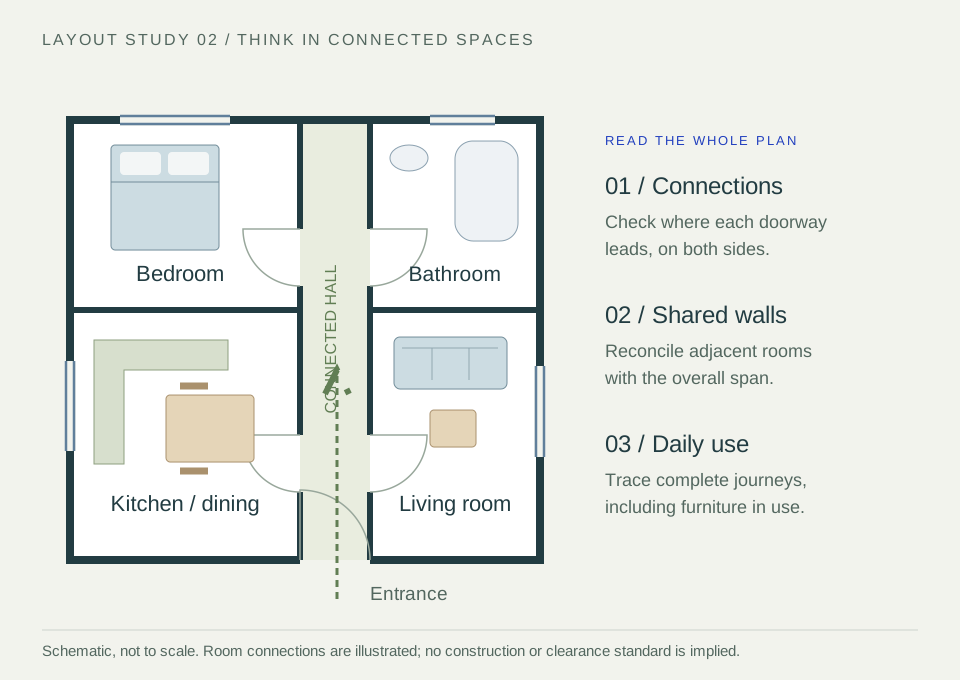
The illustration above is a single-level relationship study. It shows each room opening onto a hall; it does not establish suitable corridor widths, compliant escape routes or the feasibility of altering any wall.
2. Join the rooms with a shared measurement reference
Choose a consistent reference direction and work around the building. Measure internal room spans and locate openings from identifiable corners. Keep a record of which wall face each dimension uses. A distance between internal faces cannot be substituted for an external building dimension.
Where two rooms share a partition, their combined width includes that partition. In the worked example below, a 3,300 mm room and a 2,550 mm room are separated by an assumed 150 mm partition. The overall internal span across both rooms is 3,300 + 150 + 2,550 = 6,000 mm.
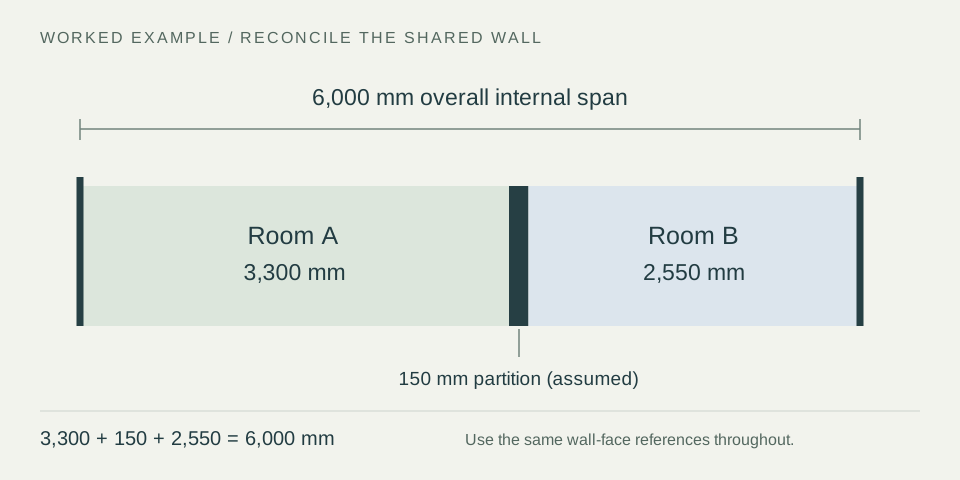
If the overall measured span differs, check the wall-face references, the partition assumption, recesses and the measurements themselves. Do not resize a room silently to make the drawing close. Record what is known and revisit the inconsistency before using the plan for a consequential decision.
Place a shared doorway consistently on both sides of the partition. A window should align with the wall it belongs to, and a corridor should meet the rooms it serves. Use the measurement guide for individual room checks, then verify these connections at building level.
3. Review the routes through the house
Start at the entrance and follow an ordinary task: carrying shopping to the kitchen, reaching a bedroom or moving from a dining chair to the bathroom. Trace the complete route across rooms rather than judging each space in isolation.
Add representative furniture using actual outside dimensions. Check door swings, drawers and chairs in use, and ask where two activities overlap. A route may be clear with every door closed but obstructed when a cupboard is open. A larger-looking room can also be less useful if circulation cuts through its main furniture group.
Compare one proposed change at a time against the existing plan. Record the benefit and the trade-off: a new opening may shorten a route while reducing usable wall length; an extra cupboard may improve storage while constraining access. Confirm structural and service implications with the appropriate professional before treating a proposal as buildable.
For a property with more than one level, keep each level clearly identified. A practical documentation approach is to save a separate project and export for each level, use the same orientation, and record how stairs or other connections relate. Do not assume that separately drawn levels automatically align or form a coordinated building model.
4. Make a floor map another person can understand
Keep the overhead view as the primary explanation of room relationships. Add a 3D view when it clarifies height, enclosure or the way spaces meet. See the 2D-to-3D workflow for choosing a view that answers the recipient’s question.
Inspect the whole-house drawing at the size the recipient will use: room names and connections must remain readable across the complete level. If labels are crowded, include a separate detail view rather than squeezing everything into one image. Follow the export and backup checklist for file formats and saving steps. Do not assume an image or PDF has a verified print scale.
- Identify the level, drawing purpose, date, revision and option.
- State the measurement units and whether the plan shows an existing or proposed layout.
- Flag estimates and list the measurements still requiring a site check.
- Keep written dimensions with the plan; do not invite someone to measure off an unverified image.
- Save an editable .floorplan3d backup as well as the exported view.
For a client or contractor discussion, a concise note is often enough: “Ground floor, option B, concept layout. Dimensions in millimetres. Kitchen opening width to be verified.” Share building layouts with intended recipients and leave out personal details that are unnecessary for the discussion.
Once the room relationships and furniture are settled, use the free house electrical layout planner walkthrough to add proposed sockets, switches and lights. Keep existing and proposed equipment distinct, use consistent point references across rooms, and bring the exported electrical layout and schedules to your electrician for review.
For whole-house heating planning, use the Heating Layout Planner for radiators and UFH on the same floorplan. Review the room-by-room heat losses, shared-wall assumptions and emitter choices; separate level drawings need a coordinated professional system design.
The whole-house energy and insulation hub helps organise construction assumptions and retrofit comparisons around the same geometry. Exposed roofs and floors, and boundaries between levels, need appropriate review.
Questions about free house floor plans
Can I use the house floor plan creator free of charge?
Yes. FreeFloorplan3D currently includes 2D drawing, 3D views, PDF/PNG/JPG exports and editable project downloads without registration or payment. Projects are saved locally in your browser; download a backup to keep your work or move it to another device.
Can I turn a floor map into an architectural drawing?
You can use it as a clear starting brief. An architectural drawing set may also need surveyed information, elevations, sections, construction details and project-specific checks. A well-labelled concept helps that conversation, but its appearance does not establish that it is ready for construction or approval.
What if my floor map does not match an estate-agent plan?
Check when and why the earlier plan was prepared, its units and whether the dimensions use the same reference faces. Keep it as a reference, then reconcile it with current site measurements. Where an area or boundary matters to a formal transaction, obtain appropriate professional measurement advice.
Continue your planning
Free room floor plan maker: from measurements to a usable layout
Revisit the four floorplan essentials, or explore insulation, heating and electrical planning using the same layout.