
Start with what plugs in.
List the equipment at a desk, bedside, television or reading corner. Include occasional uses. A proposed outlet hidden behind a fixed cabinet may not serve the activity you intended.
Plan sockets, switches and lighting on a measured floorplan. Our free electrical layout maker lets you draw connection relationships, organise circuit labels and prepare a clearer brief for your electrician.
Included in the free tier. Electrical Layout is free to use and export. No paid plan or account is needed. In the planner, open Tools → Full Electrical Layout module.
For equipment locations and project discussions. Final electrical design and installation need a qualified professional.
A useful residential electrical plan starts with a reliable room outline. Equipment positions make more sense when you can see the doors, furniture and fixed features around them.
Open the planner, then choose Tools → Full Electrical Layout module. Fitting placement, drawn connections, named circuit groups, equipment lists and connection schedules are included. You do not need a paid plan to use these electrical layout tools.
Draw rooms, enter dimensions, and add doors and windows. Select a closed room before placing equipment. Browse Library → Object catalogue → Electrical or use Add electrical fitting in the module.
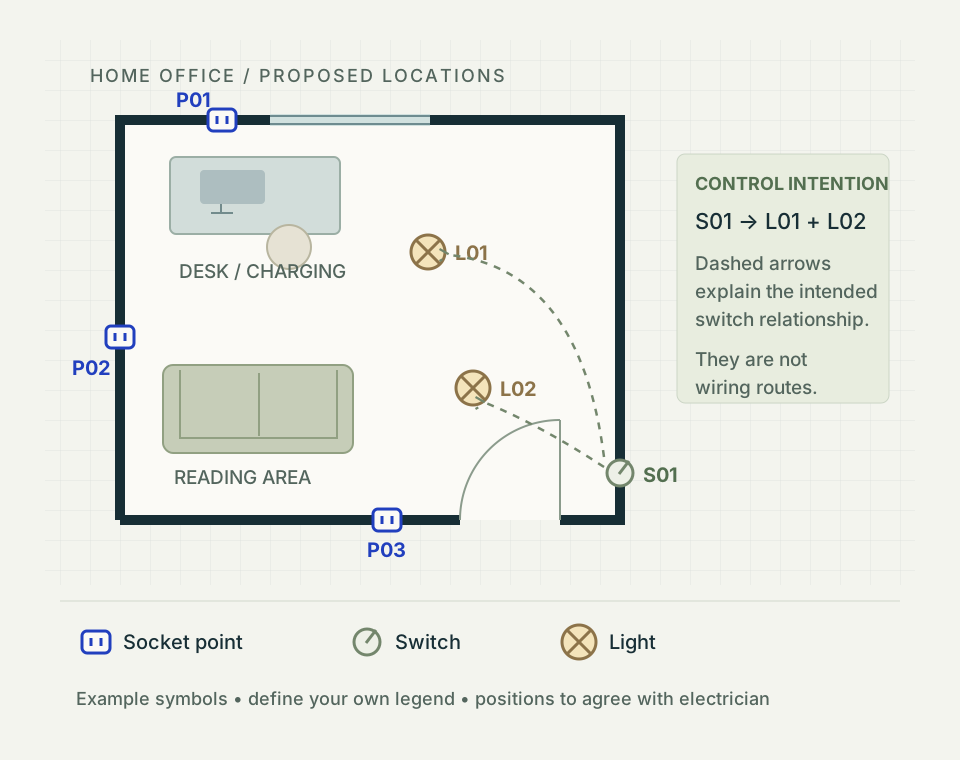
The electrical floor plan maker includes sockets, switches, ceiling lights, pendants, wall lights, alarms, extractor fans and consumer units. Use Tools → Annotate for point labels and notes. In the module, use Connect to draw a relationship between fittings and New circuit to organise another group. These are schematic relationships, not validated cable routes.
Keep 2D as your main location drawing. Use 3D to explain the space, then return to dimensions and site measurements to check the proposal. The room measurement guide helps you prepare that foundation.
Use an electrical socket planner after the furniture is drawn. Plan where people work, read, charge devices and clean, then check whether each proposed point is reachable.
List the equipment at a desk, bedside, television or reading corner. Include occasional uses. A proposed outlet hidden behind a fixed cabinet may not serve the activity you intended.
Use a light switch layout planner to review arrival at each doorway. Check the door open as well as closed, the furniture beside it and the route into the room.
Write “S01 controls L01 and L02” rather than leaving a line unexplained. An annotated arrow shows the intended relationship; an electrician determines the wiring route and method.
A lighting and socket plan can reveal missing locations or awkward access early. It cannot establish circuit capacity or confirm that a proposed installation is safe.
Use the free electrical layout planner for a kitchen renovation by starting with the cabinet and appliance layout before deciding where electrical points belong. Record the oven, hob, extractor, fridge, dishwasher and any built-in microwave or other fixed equipment. Add the everyday worktop activities: kettle, toaster, coffee machine or food preparation.
Keep fixed appliance supplies, worktop sockets and lighting as separate entries in your brief. A kitchen socket layout should also consider whether controls remain accessible once an appliance or cabinet is fitted. Your electrician should agree appropriate locations, isolation arrangements and protection.
Write down the actual appliance model and manufacturer’s connection requirements. The floorplan communicates where it sits; the specification informs the professional design. Avoid treating a generic catalogue object as an electrical specification.
For UK safety information, see Electrical Safety First’s kitchen advice. Requirements in other countries may differ.
Download the electrical planning checklist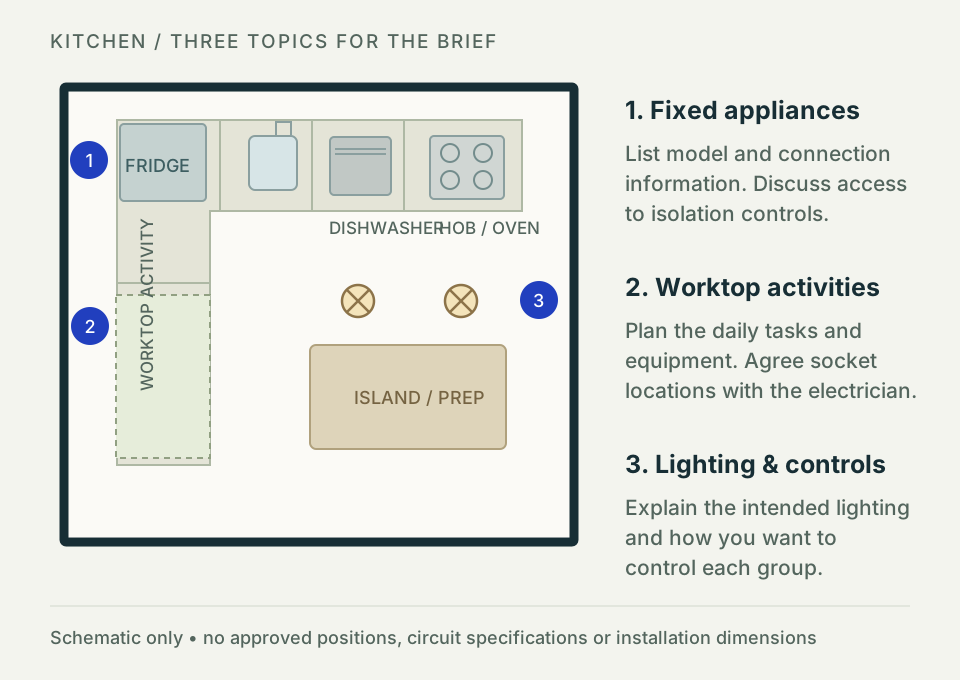
A bathroom electrical plan should begin with the bath, shower, basin and fixed furniture accurately located. Record the lighting, mirror, extraction and equipment you want to discuss. Note ceiling heights and any information the electrician needs to assess the room.
Bathroom electrical installations are subject to local regulations. Ask a qualified electrician to determine permitted equipment, bathroom zones, product ratings, controls and protection. A drawn light or socket does not mean that it is suitable in that position.
Use the bathroom lighting layout as a brief for the effect you want, such as general illumination and mirror lighting. Have the final arrangement checked before ordering or installation. Electrical Safety First’s bathroom advice explains why specialist checks matter in UK homes.
Use a free house electrical plan maker to bring room-by-room proposals together. Include room names, the level, the drawing date and the revision so everyone discusses the same option.
For a renovation electrical plan, distinguish existing items to retain from proposed additions and items whose condition or location needs checking. Use written status labels and a legend alongside any colours. Record an existing consumer unit only where its location is known; a drawn symbol does not verify capacity or suitability.
A house extension electrical plan should show how the new space relates to the existing building. Draw connecting doors, appliance locations and the activities the extension will support. Your electrician assesses how any new work can be supplied and what changes to the existing installation are required.
For a larger property, keep each level clearly named and use consistent references in the point lists. The whole-house floor map walkthrough explains how to reconcile connected rooms; the layout review guide helps you check access around furniture and openings.
Keep heating decisions on the same geometry too. The free Heating Layout Planner uses your room outlines for heat loss, radiator sizing and underfloor-heating layouts. Coordinate radiator positions with electrical points and keep the professional system checks separate.
For fabric upgrades, explore the EPC improvement and insulation planning workflow on the same measured plan. Review lining depths and window changes before settling electrical positions; the thermal comparison is not an official EPC.
Follow the same measured floorplan workflow, then add equipment locations and a concise brief. Keep the editable project together with your exported drawings.
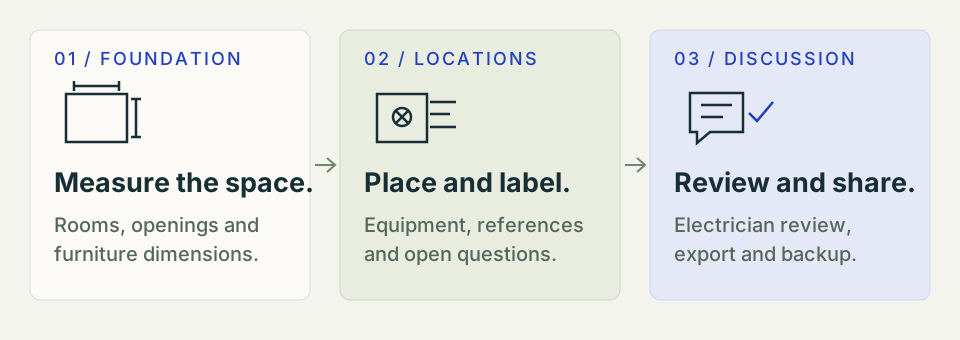
Open the existing planner and draw a closed room outline in 2D. For a house, establish shared walls and connections before adding detail.
Check wall lengths against your site notes. Use a consistent unit and mark estimates. Follow the measurement checklist if dimensions disagree.
Show door swings and the actual footprints of large items. These help explain access to sockets and switches.
Choose Tools → Full Electrical Layout module. Select a closed room, then use Add electrical fitting to place sockets, switches and lights. The module is included in the free tier.
Label sockets, switches and lights consistently. Use Connect to draw intended relationships and New circuit to organise named groups. Use Tools → Annotate for accompanying notes. An electrical symbols floor plan needs a legend that explains each reference.
Check the site and discuss equipment, quantities and locations. Have the professional resolve circuit design, load, cable, protection and local compliance requirements.
Use the module’s Export controls for a free SVG or PNG electrical drawing. Choose PDF to open print / Save as PDF and include the equipment and connection schedules you need. Save your project with File → Save; Save layout also downloads an electrical-only file. Check the export and include open questions and product information.
An electrical drawing tool online is useful when it makes the next conversation more precise. Keep the drawing focused on the decisions you need to make.
Review furniture, appliances and lighting while the layout can still change. A visible point list helps you notice an omitted location before the brief is agreed.
Room names, references and notes help an electrician or builder locate each question. Include a 3D view when it explains the space, with the 2D drawing as the location reference.
Save the agreed revision and record later changes. Keep your electrical layout beside the main floorplan, product information and professional installation documents.
Free features, exports and the role of your electrician.
An electrical floor plan shows the proposed or existing positions of equipment on a building layout: sockets, switches, lights, appliances and other points. A location plan helps explain what you want. Circuit details, protection, cable sizing and installation requirements need a separate professional design.
Yes. Electrical Layout is included in the FreeFloorplan3D free tier, not a time-limited trial. Place electrical fittings, draw connection relationships, organise circuit labels and prepare equipment and connection schedules without a paid plan. Open the planner and choose Tools → Full Electrical Layout module.
Draw the room and furniture first. List what you use at each location, including occasional tasks such as cleaning or charging. Place proposed socket points where they can be reached and label uncertain positions. Review the locations, quantity and installation requirements with your electrician.
There is no single number that suits every room or jurisdiction. Start with the equipment and activities you expect, then consider the furniture layout and future needs. Ask a qualified electrician to determine the appropriate provision under the rules that apply to your property.
Yes. Use the free Electrical Layout module to prepare a visual layout and project brief. Show cabinets, fixed appliances, worktop activities and proposed light or socket locations. Record appliance model information separately and ask your electrician to assess supply, isolation, protection and suitability.
Yes. The catalogue includes switches, ceiling lights, pendants and wall lights. Place these fittings and draw the intended control relationships in the free Electrical Layout module. Use annotations to label points and explain which lights a switch is intended to control. These notes express your proposed arrangement; they do not calculate a circuit or create an approved wiring design.
Yes. Share a readable overhead export, a point list and the questions you want to resolve. Mark whether it is an existing layout or a proposal, and include a date and revision. Your electrician should verify the site and develop the installation design and any required certification.
Yes. A suitably qualified professional should check the final electrical design, equipment locations, installation and regulatory requirements. This is especially important in bathrooms and when adding circuits or changing an existing installation.
The Electrical Layout module lets you draw equipment connections, add circuit labels and prepare connection schedules. These layout tools are included in the free tier. Drawn routes express a layout intention; they do not automatically size cables, calculate electrical loads, verify circuit design or certify compliance.
Draw the measured house layout and identify the existing equipment to retain, proposed additions and positions that need checking. Use the free electrical layout planner to place fittings and draw their intended connections, then review the proposal and unresolved questions with your electrician.
Yes. Show the room layout, place proposed sockets, switches and lights, and give each point a reference. The Electrical Layout module supports drawn connection relationships and schedules. These tools are included in the free tier. Your electrician must verify the final locations and installation design.
Yes. Open the planner in your browser and use the Electrical Layout module without creating an account. Save an editable project backup to your device after important changes. A local browser draft is not automatic cloud storage, and private browsing or clearing site data can remove it.
Yes. Use Export inside Electrical Layout for an SVG or PNG drawing, or choose PDF to open the print / Save as PDF view. The PDF option can include an equipment list, connection summary, connection schedule and circuit schedule. Check the exported drawing and label it as an existing layout or proposal before sharing it.
By the FreeFloorplan3D team · Updated · AI-assisted content
This guide addresses layout planning. Check applicable rules and the suitability of each proposed installation with a qualified electrician.