What should a floor planner creator let you do?
Start with the task you need to complete. For a room rearrangement, look for editable dimensions, doors and windows, furniture footprints, a readable overhead view and a way to save your work. A 3D view is useful for explaining the arrangement, while written dimensions are what you return to for fit decisions.
FreeFloorplan3D provides 2D drawing, 3D views and PDF, PNG or JPG exports in the browser, without registration. An editable .floorplan3d file lets you return to the project later. The steps below work for a bedroom, home office or living room; use dimensions from your own space and the products you actually intend to use.
1. Make a small measurement record
Sketch the room on paper before opening the editor. Pick one corner as a reference and work around the perimeter in a consistent direction. Record each wall, the positions of openings, any recesses and fixed features such as radiators or columns. Note heights where they affect tall furniture or a sloping ceiling.
- Use one unit. The example below uses millimetres: 4.2 m becomes 4,200 mm.
- Measure opening positions. Record the distance from the reference corner to the opening, its width and the remaining wall segment.
- Keep uncertainty visible. Mark a dimension as measured, estimated or inaccessible in your notes. Do not turn a guess into an apparently precise number.
- Check the shape. A room that looks rectangular may not be square. Compare diagonals as well as wall lengths before forcing it into a rectangle.
If your measurements disagree, recheck the reference points before drawing around the discrepancy. The room measurement guide explains dimension chains and includes a checklist you can take to the room.
2. Draw the shell before the furniture
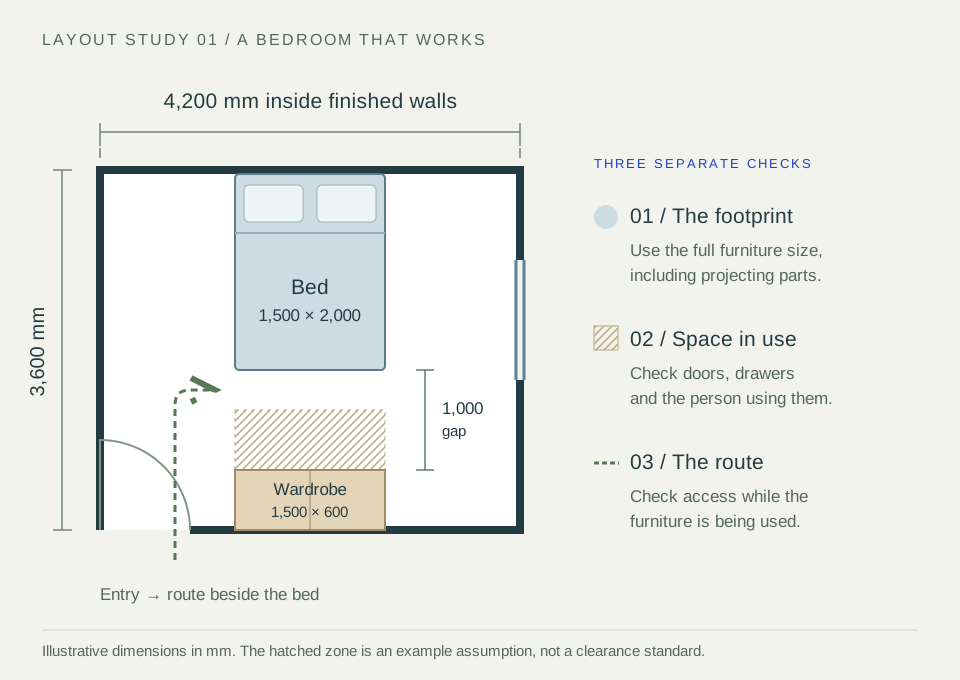
For this worked example, assume a rectangular bedroom with internal dimensions of 4,200 × 3,600 mm. Those dimensions describe the inside faces of the finished walls. Add the door and its opening direction, then the window. Check the drawn outline against the measurement record before developing a furniture arrangement.
Our example uses an assumed bed footprint of 1,500 × 2,000 mm and a wardrobe footprint of 1,500 × 600 mm. These are illustrative outside dimensions, not product recommendations. In your project, use the complete bed frame, not just the mattress size; include handles, projecting plinths and other parts of the actual furniture.
Place the largest fixed commitments first. Then look for the everyday route from the entrance to the bed, wardrobe and window. Leave decorative objects until the layout can answer the basic question you started with.
3. Check the space left when things open
In the illustrated arrangement, the bed faces a wardrobe on the opposite wall. Along that axis, the arithmetic is 3,600 − 2,000 − 600 = 1,000 mm. That is the empty gap between the furniture footprints. It is not all spare circulation space once the wardrobe is being used.
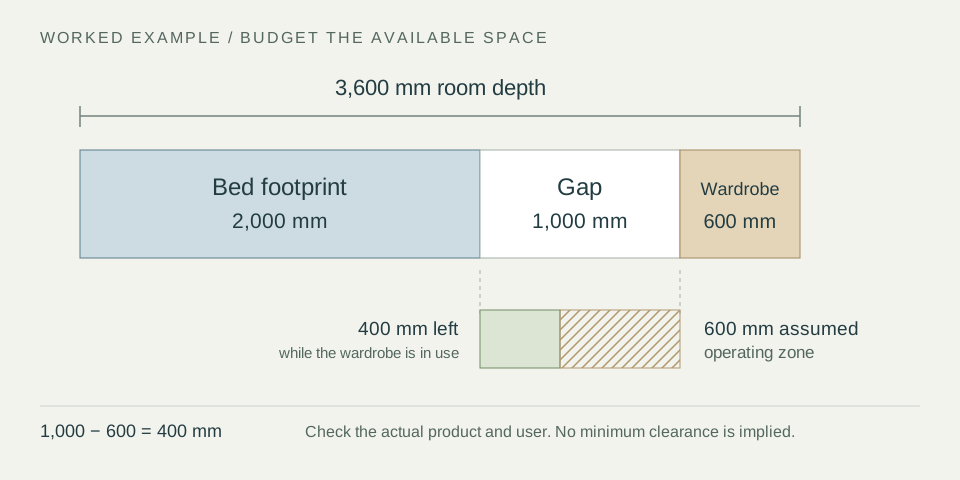
If using the wardrobe occupies 600 mm of that gap, only 400 mm remains while it is in use. That calculation does not establish whether the arrangement is suitable. It reveals the question to investigate: will an open door, drawer or person block the route someone else needs?
Check these three conditions separately: everything closed; each item open or in use; and the route through the room at the same time. A bed and a wardrobe may fit geometrically yet work poorly together. Try moving the wardrobe to another wall or choosing a different depth, then repeat the check with the actual dimensions.
Keep a note of the largest uncertain dimension. Where a fit is tight, use the smallest plausible available space and the largest plausible product size for an initial check, then verify on site before committing. The layout review checklist gives you a repeatable way to review routes and operating space.
4. Compare an option and keep a usable record
Save the measured starting point before changing the layout. Download an editable backup, then compare one change at a time: bed orientation, wardrobe position or desk location. Name the files clearly, for example Bedroom-existing-2026-09-25.floorplan3d and Bedroom-option-A-2026-09-25.floorplan3d.
Use 2D to review openings, furniture positions and dimensions. Switch to 3D when you need to explain heights or the relationship between objects. A perspective image can make a proposal easier to understand, but it cannot verify a measurement or a delivery route through the rest of the building.
For this room study, choose an overhead view that makes the door swing, furniture positions and unresolved dimensions readable. Add a perspective view only if it explains something the plan does not. Keep the editable project separately from the views you share.
A useful handover might contain one annotated 2D plan, one explanatory 3D view and three short notes: what is measured, what is proposed and what still needs checking. See the saving and sharing guide for the difference between an export and a project backup.
Once the furniture arrangement is settled, use the free electrical layout maker guide to plan reachable sockets, light positions and switch controls around it. Electrical Layout and its drawing exports are now included in the free tier; review the final installation with your electrician.
The same room outline can also support the floorplan-based room heat loss and radiator sizing workflow. Add the thermal inputs rather than measuring the room again, then check that radiator locations and furniture access work together.
Explore the insulation thickness and before/after heat-loss workflow before choosing new wall linings. Record the full system depth and update room dimensions where the work takes usable space.
Common room-planning questions
Can I make and download a room floor plan for free?
Yes. The current FreeFloorplan3D planner includes drawing, 3D viewing, PDF/PNG/JPG exports and editable project downloads without a payment step or account. Save a project backup after important changes; the browser draft is local to the device and is not automatic cloud storage.
Why does the drawing fit but the real furniture does not?
Recheck the measurement reference, overall product dimensions, skirting, handles, radiators and uneven walls. Check the delivery route separately from the final position. A nominal catalogue width or mattress size may not describe the complete object you need to place.
Can I use this for an architectural or construction floorplan?
Use the study to communicate a brief or compare ideas. For building work, fitted items or regulated requirements, obtain the measured information and project-specific professional advice needed for the decision. An illustrative layout is not a construction drawing.
Continue your planning
A floor map maker for a clearer whole-house plan
Revisit the four floorplan essentials, or explore insulation, heating and electrical planning using the same layout.